How to Transfer Points to Another Player at TOWER Casino

Step-by-Step Player-to-Player Transfer at TOWER Casino
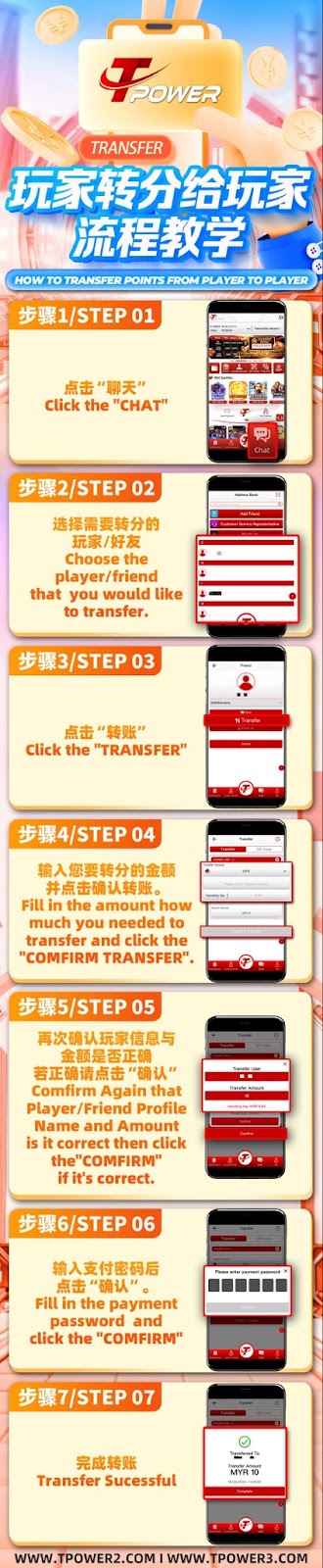
Step 1: Access the Chat Function
Log into your TOWER Casino account and locate the "Chat" icon or section within the platform interface to begin the transfer process.
Step 2: Select the Recipient Player or Friend
Within the chat interface, find and select the player or friend you wish to transfer T-POINTS to at TOWER Casino. Ensure you have the correct username.
Step 3: Initiate the Transfer
Once in the chat with the selected player, click the "Transfer" button or option to open the point sending menu within TOWER Casino.
Step 4: Enter Transfer Amount
Enter the exact amount of T-POINTS you wish to send. Double-check the number before proceeding to the next step at TOWER Casino.
Step 5: Confirm Recipient and Amount
A confirmation screen will appear at TOWER Casino showing the recipient's profile name and the transfer amount. Verify that all details are accurate.
Step 6: Authorize with Payment Password
For security, TOWER Casino requires you to enter your unique payment password to authorize the point transfer transaction.
Step 7: Complete the Transfer
After entering your password, click "Confirm" to finalize. You will receive a "Transfer Successful" notification from TOWER Casino upon completion.
Important Rules for Player Transfers at TOWER Casino
Transfer Limits and Eligibility
TOWER Casino may impose daily or per-transaction limits on player-to-player transfers. Ensure both accounts are in good standing and eligible for transfers.
Non-Refundable Transactions
Point transfers at TOWER Casino are typically final and non-refundable. Always double-check the recipient and amount before confirming.
Security and Authorized Use
TOWER Casino's transfer feature is designed for legitimate point sharing between players. Any misuse, such as unauthorized trading or fraud, is prohibited and may result in account suspension.
Benefits of Using Player Transfers at TOWER Casino
Quick and Convenient Point Sharing
The player transfer feature at TOWER Casino allows you to quickly send T-POINTS to friends or fellow players without external payment methods.
Enhanced Social Gaming Experience
Sharing points fosters a more interactive community within TOWER Casino, enabling teamwork, gifting, or collaborative gameplay.
Secure Internal Transaction System
Transfers are conducted securely within the TOWER Casino platform, protected by your payment password and monitored for safety.
Tips for Safe Player-to-Player Transfers at TOWER Casino
Verify the Recipient's Identity
Always ensure you are sending points to the intended recipient at TOWER Casino. Use the chat function to confirm their identity if needed.
Keep Your Payment Password Secure
Never share your TOWER Casino payment password with anyone. This password is essential for authorizing transfers and protecting your funds.
Check Transfer History
After completing a transfer, you can review the transaction in your TOWER Casino account history for your records and verification.
Contact Support for Disputes
If you encounter an issue with a player transfer at TOWER Casino, contact customer support immediately with the transaction details for assistance.
Ready to Transfer Points at TOWER Casino?
Use our secure player-to-player transfer guide to share T-POINTS easily and safely. Enhance your TOWER Casino experience by trading points with friends today.