How to Handle Point Deduction Issues at TOWER Casino

Step-by-Step Guide to Report Missing Points at TOWER Casino
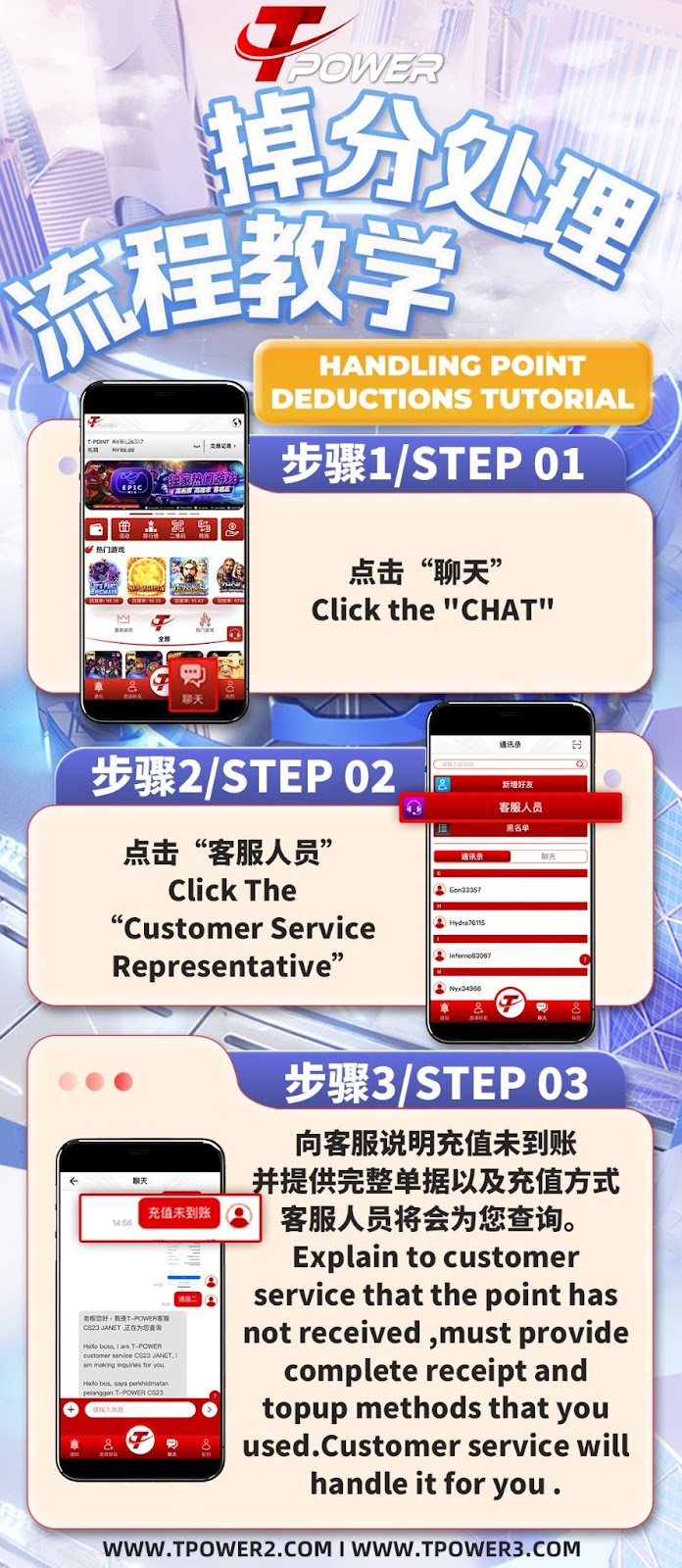
Step 1: Access the Chat Function
Log into your TOWER Casino account and locate the "Chat" icon within the platform interface. This is your primary channel for direct support communication.
Step 2: Contact Customer Service
Within the chat menu, navigate to the contacts list. Find and select the "Customer Service Representative" option to initiate a conversation with TOWER Casino support.
Step 3: Clearly Describe the Issue
Explain to the TOWER Casino support agent that your points have not been credited after a deposit or that an incorrect deduction has occurred. Be clear and concise in your description.
Step 4: Provide Complete Evidence
For TOWER Casino to investigate effectively, you must provide the complete transaction receipt, screenshot of the payment confirmation, and details of the top-up method you used (e.g., bank transfer, e-wallet, USDT).
Step 5: Wait for Investigation and Resolution
After submitting your query and evidence, the TOWER Casino customer service team will investigate the transaction. They will provide updates and resolve the issue by crediting the missing points or correcting the balance.
Common Reasons for Point Deduction Issues at TOWER Casino
Delayed Bank or E-Wallet Processing
Sometimes, deposits to TOWER Casino via bank transfer or e-wallet may experience processing delays due to intermediary banking systems, causing a temporary point shortage.
Incorrect Transaction Details Entered
If wrong deposit details (e.g., incorrect reference number, mismatched amount) are provided during a TOWER Casino top-up, the system may not automatically credit the points.
System Synchronization Delays
Rare technical sync delays between payment gateways and the TOWER Casino platform can temporarily affect point crediting, though these are usually resolved automatically.
How to Prevent Point Deduction Issues at TOWER Casino
Always Save Your Payment Receipt
After any deposit to TOWER Casino, immediately save a clear screenshot or PDF of the transaction confirmation showing the amount, date, time, and transaction ID.
Double-Check Deposit Details
Before finalizing any deposit to TOWER Casino, verify that you have entered the correct amount and followed the on-screen instructions for your chosen payment method.
Use Recommended Payment Channels
To minimize issues, use TOWER Casino's recommended and verified instant top-up channels (e.g., Channels 1, 2, or 3) which typically offer faster and more reliable point crediting.
What to Expect from TOWER Casino Support
Professional and Timely Investigation
TOWER Casino's customer service team is trained to handle point deduction queries professionally and aims to investigate and respond within a reasonable timeframe.
Request for Additional Verification
For security, TOWER Casino support may request additional verification details from you to confirm your identity and ownership of the transaction in question.
Fair Resolution and Compensation
Once the investigation concludes, TOWER Casino will credit any missing points to your account. In cases of platform error, they may offer additional compensation as per their policy.
Need Help with a Point Deduction at TOWER Casino?
Follow our clear guide to report and resolve missing points quickly. TOWER Casino’s support team is ready to assist you in restoring your correct balance.