How to Bind Google Authenticator to Your TOWER Casino Account
Step-by-Step Google Authenticator Setup at TOWER Casino
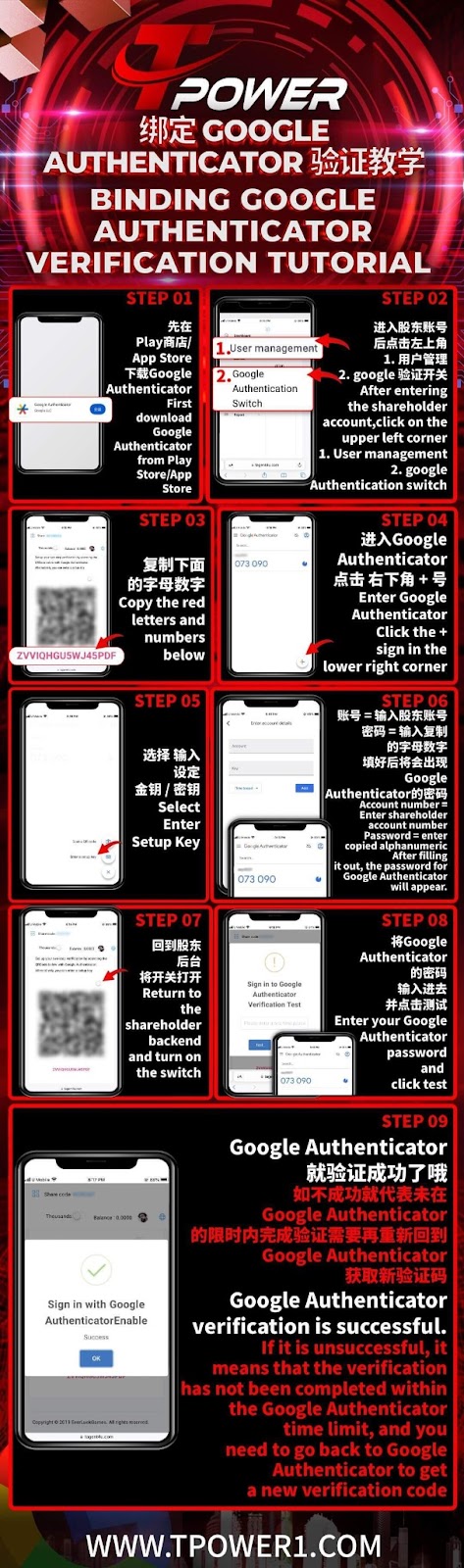
Step 1: Download Google Authenticator App
First, download the official Google Authenticator app from the Google Play Store (Android) or App Store (iOS) to your mobile device.
Step 2: Access User Management in Your TOWER Casino Account
Log into your TOWER Casino account, switch to the shareholder/backend view, and click on the user management section, usually found in the top-left menu.
Step 3: Initiate the 2FA Binding Process
Within the user management settings at TOWER Casino, locate the Google Authenticator binding or two-factor authentication option to begin the setup.
Step 4: Copy the Setup Key from TOWER Casino
TOWER Casino will generate a unique alphanumeric setup key (or QR code). Copy this key carefully or prepare to scan the QR code with the Google Authenticator app.
Step 5: Add Account to Google Authenticator
Open the Google Authenticator app on your phone. Tap the "+" (Add) button, then choose "Enter a setup key." Paste the key copied from TOWER Casino or scan the provided QR code.
Step 6: Enter Account Details and Complete Setup
In the Google Authenticator app, enter an account name (e.g., "TOWER Casino") and the setup key. The app will then generate a time-based verification code for your TOWER Casino account.
Step 7: Enable 2FA in Your TOWER Casino Account
Return to the TOWER Casino user management page. Enter the 6-digit verification code displayed in your Google Authenticator app, then toggle the 2FA switch to "ON" and click "Test."
Step 8: Verify and Confirm Successful Binding
If the test is successful, TOWER Casino will confirm that Google Authenticator is now active. Your account is now protected with two-factor authentication.
Why Enable Google Authenticator at TOWER Casino?
Enhanced Account Security
Binding Google Authenticator adds a critical second layer of security to your TOWER Casino account, protecting it from unauthorized access even if your password is compromised.
Secure Login and Transactions
With 2FA enabled, every login or sensitive action at TOWER Casino requires a unique code from your mobile device, significantly reducing the risk of fraud.
Industry-Standard Protection
Google Authenticator is a globally trusted 2FA method. Using it with your TOWER Casino account aligns with best practices for online security.
Important Tips for Google Authenticator and TOWER Casino
Securely Backup Your Setup Key
After binding, TOWER Casino recommends saving your setup key or QR code in a secure place. This is essential for recovering access if you lose your phone or change devices.
Keep Your Device Time Synced
Google Authenticator codes are time-based. Ensure your mobile device's clock is set to automatic time synchronization to avoid code mismatches when logging into TOWER Casino.
Use the Codes Promptly
The 6-digit codes refresh every 30 seconds. When logging into TOWER Casino, enter the current code promptly. If it fails, wait for the next code and try again.
Contact Support if You Lose Access
If you lose access to your Google Authenticator app, contact TOWER Casino customer support immediately with your account details to regain access through alternative verification.
Secure Your TOWER Casino Account with 2FA Today
Follow our detailed guide to bind Google Authenticator and add a powerful layer of security to your TOWER Casino experience. Protect your funds and play with confidence.